How to create a database user in cPanel?

To create a new database user, please follow these steps:

1. Enter your administrative credentials.
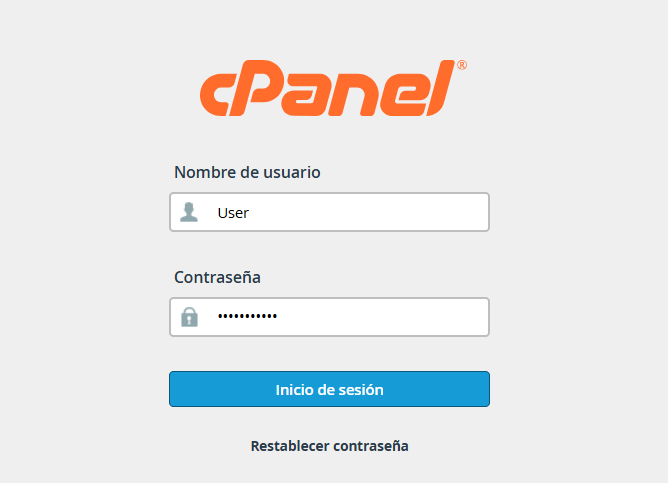
access.png

2. Find the "Databases" section and select MySQL Databases (or "Manage my databases," depending on your interface theme).
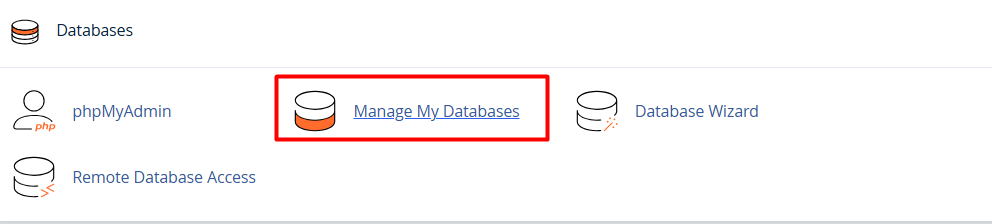
admin.png

3. Scroll down to the MySQL Users / Add New User section.

Fill out the form:


• Username: Enter the name you wish to assign to the database.


• Password: Enter and confirm a secure password for the user.
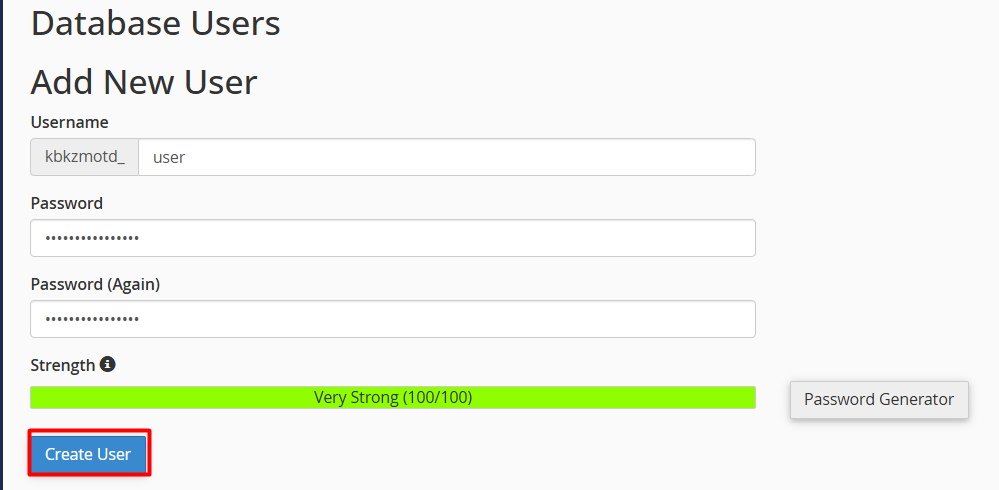
 

Complete the process: Click the Create User button.


Note: After creating the user, remember to add them to your specific database and assign the necessary privileges so they can manage the data.

  • 0 Users Found This Useful
Was this answer helpful?

Related Articles

How to Assign a User to a Database?

User assignment is a critical security measure that allows for the management of external...

Create a Database using the Database Wizard

Using the MySQL Database Wizard is the most efficient and direct way to set up your data. This...

How to Create a Database in Manage My Databases

The creation of a database is a fundamental process for the operation of web applications and...

How can I connect remotely to my database from cPanel?

Enabling remote access allows you to manage your databases using external tools like MySQL...

How can I manage user permissions in my database?

To enable a user to create, modify, or delete content within a database, it is essential to...