How to create email filters in cPanel?

 
Email filters are custom rules that allow you to automatically organize your incoming messages. With them, you can divert emails to specific folders, discard spam, or redirect messages based on criteria such as the subject or the sender. 


1. Log in to your cPanel control panel.


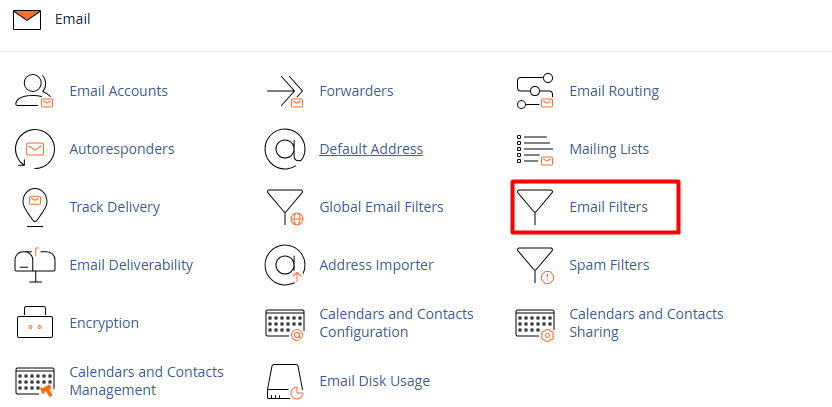
2. In the Email section, choose Email Filters.


3. Select the account where the filter will be applied and click Manage Filters, then select Create a New Filter.



4. Rule Configuration:


4.1. Filter Name: Assign a descriptive name to identify the rule.


4.2. Rules: Define the condition (for example: if the "Subject" contains the word "Invoice").


4.3. Actions: Choose what the system should do with that email (for example: "Deliver to folder" or "Discard Message").


4.4. Activate the filter: Press the Create button to put the rule into operation.
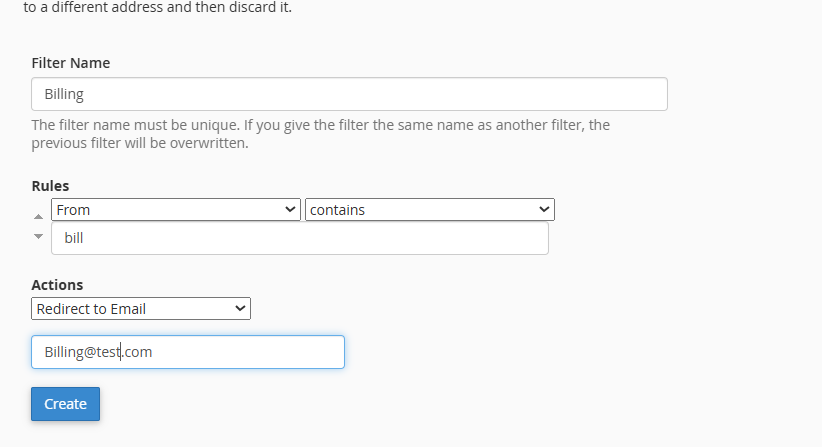


Finish by selecting the Create button. 

Notes:
 
• Use Email Filters (Individual): When you need to organize a specific account (for example, so that sales emails go to a special folder only in the info@yourdomain.com account). This is the ideal option for maintaining personal order without affecting other users.

• Use Global Email Filters: When you want to apply a security or administrative rule to all accounts on your domain simultaneously. This is the perfect tool for blocking unwanted senders or filtering spam keywords across your entire organization in one go.

  • 0 Users Found This Useful
Was this answer helpful?

Related Articles

How to set up an email forwarder in cPanel?

An email forwarder allows you to automatically send a copy of all incoming emails from one...

How to create Global Email Filters in cPanel?

  A Global Filter is a powerful administrative tool that allows you to apply automatic rules to...

How can I create a new email account from cPanel?

To create a corporate email account linked to your domain, please follow this detailed procedure:...

How can I manage my email accounts from cPanel?

Managing your email accounts is a simple and intuitive process. Follow these steps to configure...